Products · Attendance & check-in

Attendance you can stand behind when someone asks.

Adult Day Genie replaces the paper sign-in sheet with consent-based face confirmation or manual check-in on an append-only record. Every arrival, departure, and correction is time-stamped and attributed, and the documentation exports in minutes.

  • Face or manual check-in
  • Corrections never erase history
  • HIPAA BAA with every center

What is inside the attendance product

Four pieces that turn a clipboard into a record: check-in at the door, a permanent history, the member list behind it, and the export a reviewer will actually ask for.

Face or manual check-in at the door

Staff tap a member as they arrive. If the member or their guardian has consented to face confirmation, the camera confirms the face and the arrival is recorded. If not, staff record a manual check-in. Manual is always available, so declining face confirmation never blocks service.

What's inside

  • Tablet or computer check-in screen at the entrance
  • Adult Day Genie Kiosk app for iPad: members check themselves in and out
  • Consent captured on the member profile before face confirmation is used
  • Manual check-in for every member, every day
  • Check-out recorded the same way, so the visit has a start and an end
  • Expected members, arrivals, and absences in one daily view
  • Nothing to install for the web check-in screen: any modern browser

Outcome: Arrivals are recorded in the moment, by a named staff member, instead of reconstructed from a clipboard at the end of the day.
An append-only attendance record

Every arrival, departure, and correction is a new time-stamped event. Updates and deletes are blocked at the database layer, so a correction is added on top of the original entry rather than replacing it. Reviewers see what was recorded, when, by whom, and what changed afterward.

What's inside

  • Time-stamped events for arrival, departure, and corrections
  • Original entries preserved when a correction is made
  • Staff identity on every entry through individual logins
  • How the entry was recorded (face-confirmed or manual)
  • A visible correction trail instead of an editable cell
  • History retained for the life of the account

Outcome: The record reads like a ledger, not a spreadsheet. When someone asks how an entry came to be, the answer is already on the page.

Member profiles and schedules

The Attendance plan includes the member profile the check-in screen depends on: contact details, authorized contacts, expected attendance days, and consent status. Directors see who is expected today and who has not arrived yet.

What's inside

  • Member profiles with contacts and authorized contacts
  • Expected attendance schedule per member
  • Face-consent status kept with the profile
  • Absence notes when a member is expected and does not arrive
  • Individual staff accounts for everyone recording attendance

Outcome: Morning check-in runs from a list that already knows who should be in the room.

Exports when a payer or reviewer asks

When a plan, state reviewer, or auditor requests attendance documentation, the center exports day-by-day records for the date range requested. The export shows presence, times, method, and the correction history, so the center does not rebuild the day from memory.

What's inside

  • Day-by-day attendance exports for any date range
  • CSV and PDF formats
  • Start and end times behind each service day
  • Correction history included, not stripped out
  • Records aligned to the daily documentation on the Daycare plan

Outcome: Attendance documentation can be produced in minutes. The software produces the record; the reviewer makes the decision.

Adult Day Genie Kiosk · iPad app

The Kiosk app for your front desk

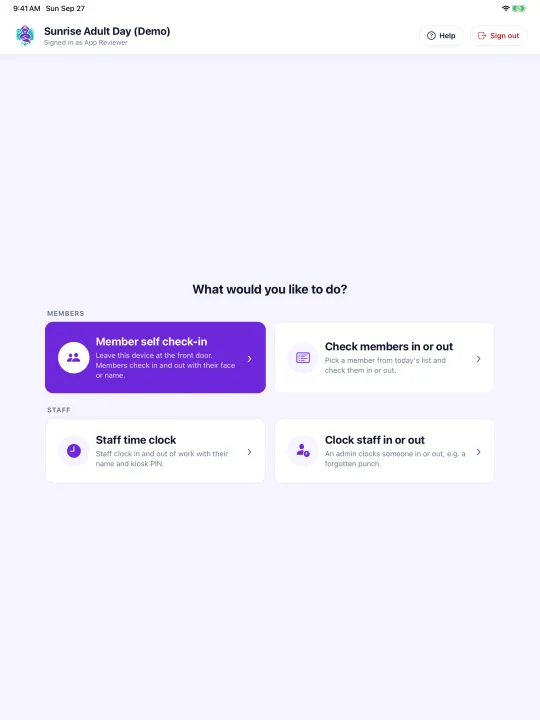
Adult Day Genie Kiosk turns a tablet at the front desk into an attendance station for your adult day center. Members check themselves in and out; staff see today’s list and clock in with a PIN. Everything lands on the same attendance record as the web app.

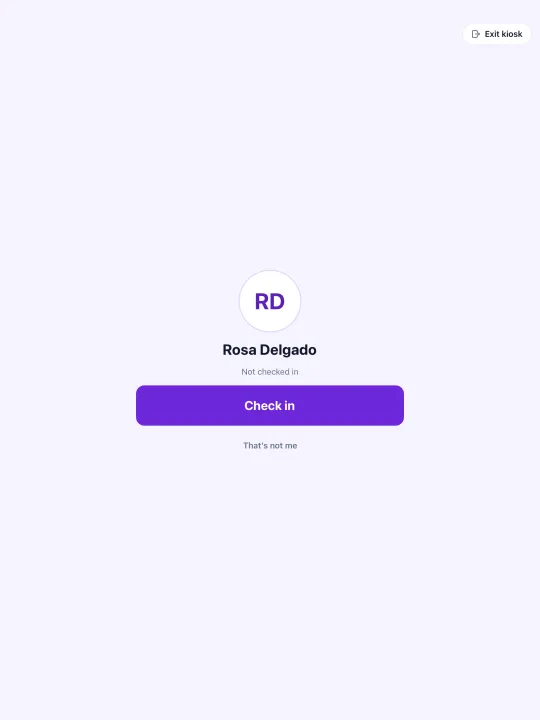
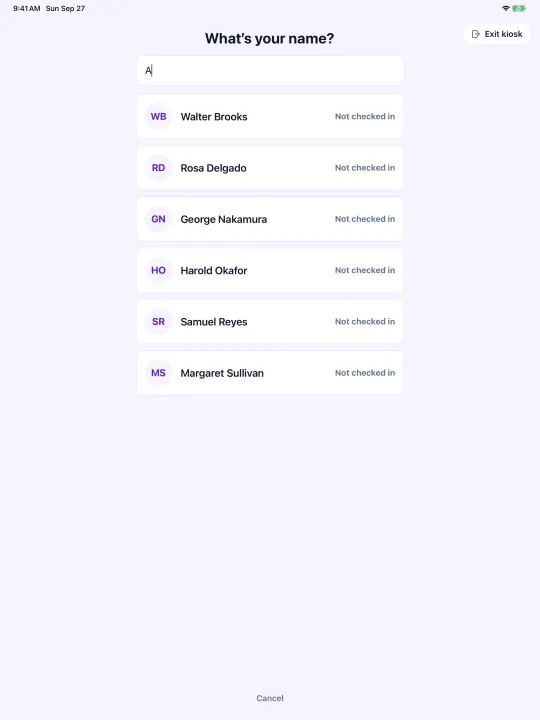
  • Kiosk Mode for members. Members check themselves in and out at the front desk. Face check-in for members the center has enrolled, with face matching run on the tablet, or check in by name with search, confirm, and a signature.

  • Today’s list for staff. Staff open today’s member list and check anyone in or out, so a busy doorway or a member who prefers help never slows down.

  • Staff time clock. Staff clock in and out with a personal kiosk PIN when the center turns it on.

  • Controlled from the web app. Admins choose which features each tablet offers and can sign a tablet out remotely from Settings → Kiosk in the Adult Day Genie web app.

Requires an Adult Day Genie account. Works on iPad today; Android tablets coming soon. More about the Kiosk app

  • Kiosk home screen on an iPad with four choices: member self check-in, check members in or out, staff time clock, and clock staff in or out.
  • Check in by name: a search box with a list of members and whether each is checked in.
  • Confirmation screen showing a member’s initials and name with a Check in button and a “That’s not me” link.
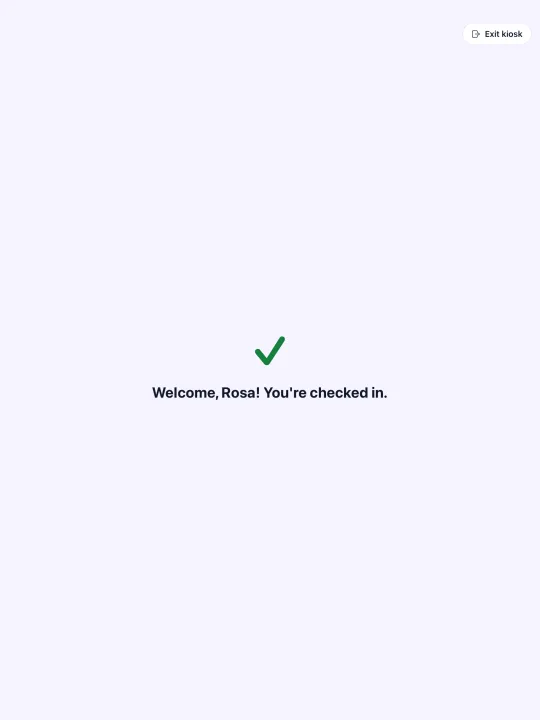
  • Green check mark with the message “Welcome, Rosa! You’re checked in.”

A morning with Adult Day Genie at the door

Attendance is the first thing that happens each day and the record everything else depends on. Here is how it runs.

  1. 1

    8:45 AM

    The check-in screen is ready

    A tablet near the entrance shows today’s expected members. Staff sign in with their own accounts, so every entry is attributed to a person.

  2. 2

    9:02 AM

    Members arrive

    Staff tap a name. For members with consent on file, the camera confirms the face. For everyone else, staff record a manual check-in. Either way, the arrival is time-stamped.

  3. 3

    9:07 AM

    A correction is appended

    A transportation note was entered on the wrong member. Staff add a correction; the original entry stays visible underneath it with its own timestamp.

  4. 4

    3:30 PM

    Check-out and the daily report

    Members are checked out as they leave. The director opens the attendance report and confirms it matches the room before closing the day.

Why the attendance record matters more than any other

Every Medicaid or managed care claim rests on proof that the participant was present on the billed day. Paper sign-in sheets are where that proof most often goes missing.

  • Claims rest on presence

    A billed day needs a record that the member was there, with times that support the units. Attendance is that record.

  • Paper fails quietly

    In a 2026 New York Comptroller audit, $672,147 in claims at three SADC facilities was disallowed for lack of adequate sign-in records.

  • Corrections are inevitable

    Wrong names, missed check-outs, and late arrivals happen. The question is whether the correction hides the original or preserves it.

  • Reviewers ask three questions

    Was the participant present, do the times support the units, and how was the entry recorded? The record should answer all three.

  • Staff should not need training

    If your team can use the photo app on their phone, they can run check-in. Tap a name, confirm, done.

  • EVV-grade, built for the building

    Adult day is outside federal EVV scope. Adult Day Genie provides EVV-grade attendance verification where EVV mandates do not reach.

Attendance & check-in questions

Direct answers to what centers ask before a walkthrough.

What is adult day care attendance software?

Adult day care attendance software records when each participant arrives and leaves a center, who recorded the entry, and how. Adult Day Genie does this with consent-based face confirmation or manual staff check-in on an append-only record, then exports the documentation when a payer or reviewer asks.

Is face check-in required?

No. Face confirmation requires consent from the member or their guardian, and manual check-in is always available. A member who declines face confirmation is checked in manually and receives service exactly the same way.

What does append-only mean for attendance?

Entries cannot be updated or deleted at the database layer. When staff need to fix something, they add a correction that references the original. The history shows both, with timestamps, so a reviewer can see what changed and when.

What does the Attendance plan cost?

The Attendance plan is $99 per center per month, month-to-month, with no setup fee. It includes face or manual check-in, the append-only attendance history, member profiles and schedules, attendance exports, and a HIPAA Business Associate Agreement.

Can I start with Attendance and add the rest later?

Yes. Many centers replace the paper sign-in sheet first. The Daycare plan adds care plans, forms, activities, meals, family updates, and operational reports on top of the same attendance record, and the Billing add-on generates 837P claims from it.

Does federal EVV apply to adult day centers?

Federal EVV covers Medicaid personal care and home health services delivered in the home, not center-based adult day services. Adult Day Genie provides EVV-grade attendance verification built for the building, without claiming a mandate applies.